Contents Menu Expand Light mode Dark mode Auto light/dark mode
Light Logo Dark Logo
Join

Documentation

  • Introduction
    • Quick Start
    • Document Elements
    • Key Concepts
  • Installation
    • Full Installation
    • Docker Installation
  • Unstructured API Services
    • SaaS API Deployment Guide
    • Azure Marketplace Deployment Guide
    • AWS Marketplace Deployment Guide
    • Python and JavaScript SDK
    • Accessing Unstructured API
    • API Parameters
    • API Validation Errors
  • Unstructured Platform
    • Workflows Automation
    • Jobs Scheduling
    • Platform Source Connectors
      • Amazon S3
      • Azure Blob Storage
      • Elasticsearch
      • Google Cloud Storage
      • Google Drive
      • OneDrive Cloud Storage
      • OpenSearch
      • Salesforce
      • SFTP Storage
      • Sharepoint
    • Platform Destination Connectors
      • Amazon S3
      • Azure Cognitive Search
      • Chroma
      • Databricks
      • Elasticsearch
      • Google Cloud Storage
      • MongoDB
      • OpenSearch
      • Pinecone
      • PostgreSQL
      • Weaviate
  • Core Functionality
    • Partitioning
    • Cleaning
    • Extracting
    • Staging
    • Chunking
    • Embedding
  • Ingest
    • Source Connectors
      • Airtable
      • Azure
      • Biomed
      • Box
      • Confluence
      • Delta Table
      • Discord
      • Dropbox
      • Elasticsearch
      • Github
      • Gitlab
      • Google Cloud Storage
      • Google Drive
      • Jira
      • Local
      • MongoDB
      • Notion
      • One Drive
      • OpenSearch
      • Outlook
      • Reddit
      • S3
      • Salesforce
      • Sftp
      • Sharepoint
      • Slack
      • Wikipedia
    • Destination Connectors
      • Astra
      • Azure
      • Azure Cognitive Search
      • Box
      • Chroma
      • Databricks Volumes
      • Delta Table
      • Dropbox
      • Elasticsearch
      • Google Cloud Service
      • MongoDB
      • Pinecone
      • OpenSearch
      • Qdrant
      • S3
      • SQL
      • Vectara
      • Weaviate
    • Ingest Configuration
      • Processor Configuration
      • Read Configuration
      • Partition Configuration
      • Permissions Configuration
      • Retry Strategy Configuration
      • Chunking Configuration
      • Embedding Configuration
      • Fsspec Configuration
  • Metadata
  • Examples
    • Data Processing into Vector Database
    • Delta Table Source Connector
    • Multi-files API Processing
  • Integrations
  • Best Practices
    • Strategies
    • Models
    • Table Extraction from PDF
Back to top
Join

Azure Cognitive Search

This page contains the information to store processed data to Azure Cognitive Search.

Prerequisites

  • API Key for Azure Cognitive Search

  • Azure Cognitive Search Index and Endpoint

For more information, please refer to Azure Cognitive Search documentation.

Warning

Ensure that the index schema is compatible with the data you intend to write. If you need guidance on structuring your schema, consult the sample index schema for reference.

Step-by-Step Guide

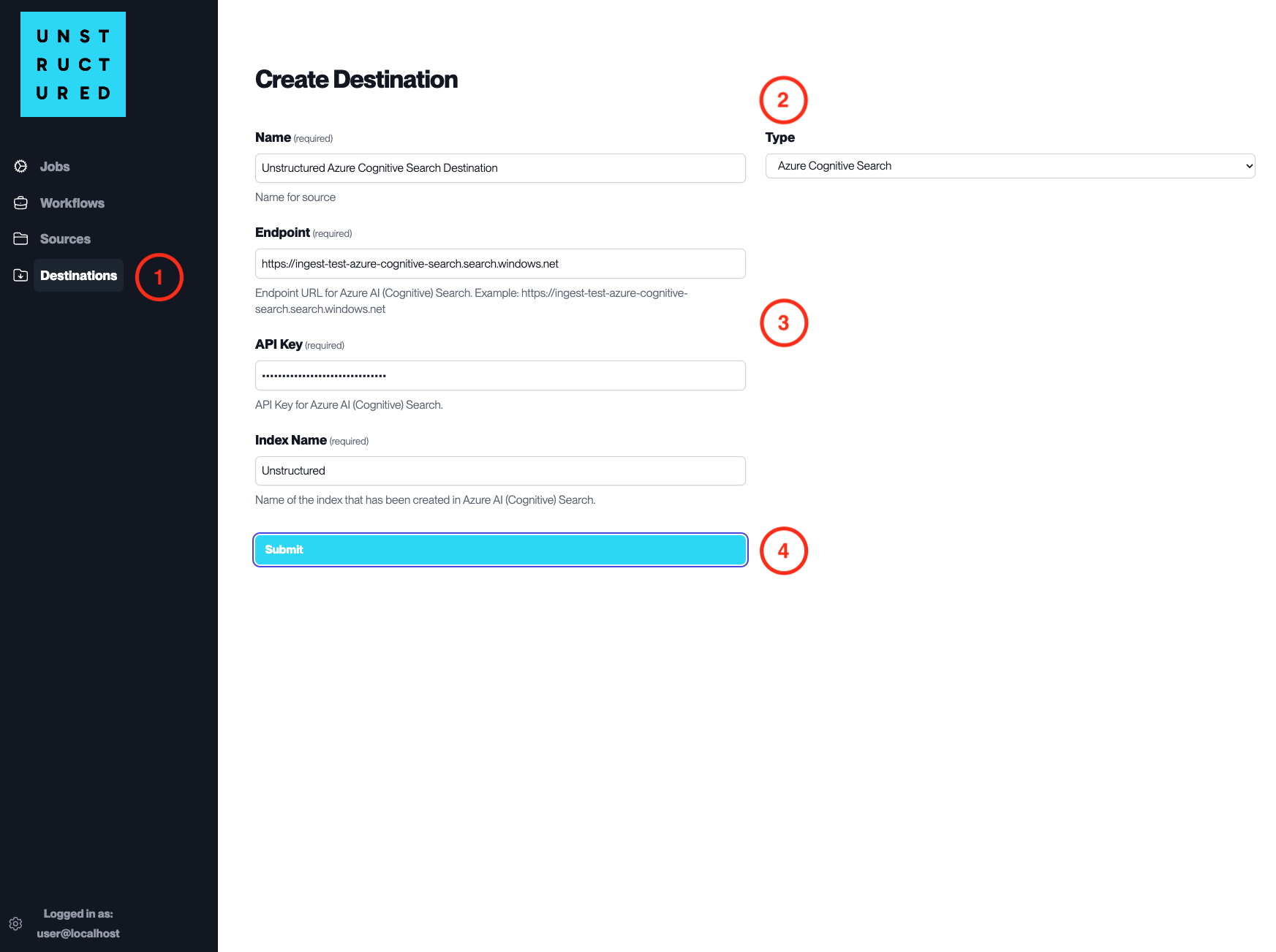
Destination Connector Azure Cognitive Search
  1. Access the Create Destination Page. Navigate to the “Destinations” section within the platform’s side navigation menu and click on “New Destination” to initiate the setup of a new destination for your processed data.

  2. Select Destination Type. Select Azure Cognitive Search destination connector from the Type dropdown menu.

  3. Configure Destination Details

  • Name (required): Assign a descriptive name to the new destination connector.

  • Endpoint (required): Enter the endpoint URL for your Azure Cognitive Search service.

  • API Key (required): Provide the API key for your Azure Cognitive Search service.

  • Index Name (required): Input the name of the index where the data will be stored.

  1. Submit. Review all the details entered to ensure accuracy. Click ‘Submit’ to finalize the creation of the Destination Connector. The newly completed Azure Cognitive Search connector will be listed on the Destinations dashboard.

Next
Chroma
Previous
Amazon S3
Copyright © 2022-2023, Unstructured Technologies
Made with Sphinx and @pradyunsg's Furo
Contents
  • Azure Cognitive Search
    • Prerequisites
    • Step-by-Step Guide