

SFTP Storage
This page contains the information to ingest your data from an SFTP server.
Prerequisites
SFTP server URL, Username and Password
Directory path to start the data ingestion from
For more information, please refer to SFTP documentation.
Step-by-Step Guide
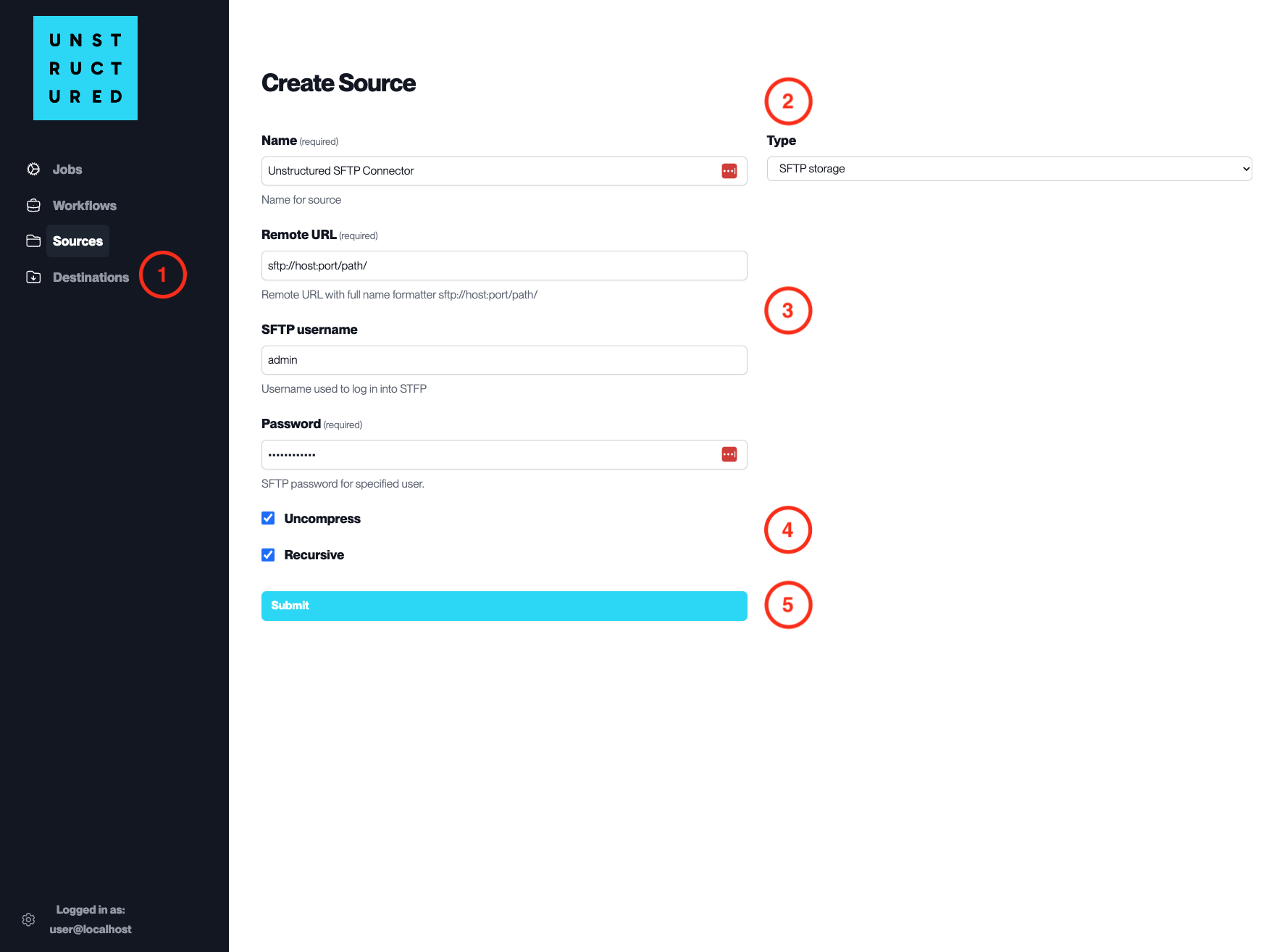
Access the Create Source Page. Navigate to the “Sources” section on the left sidebar and click the “New Source” button.
Select Source Type. Select SFTP Storage from the
Typedropdown menu.Configure Source Details to connect to SFTP
Name(required): Enter a unique name for the SFTP source connector.
Remote URL(required): Specify the SFTP server URL with the full path (e.g., sftp://host:port/path/).
SFTP username: Input the username for logging into the SFTP server.
Password(required): Enter the password associated with the SFTP username.
Additional Settings
Check
Uncompressif the files to be ingested are compressed and require decompression.Check
Recursiveif you want the platform to recursively ingest files from subdirectories.
Submit. After filling in the necessary information, click ‘Submit’ to create the Source Connector. The newly completed SFTP connector will be listed on the Sources dashboard.