

Google Cloud Storage
This page contains the information to store processed data to Google Cloud Storage.
Prerequisites
Google Cloud Storage Bucket URL
Service Account Key for Google Cloud Storage
For more information, please refer to Google Cloud Storage documentation.
Step-by-Step Guide
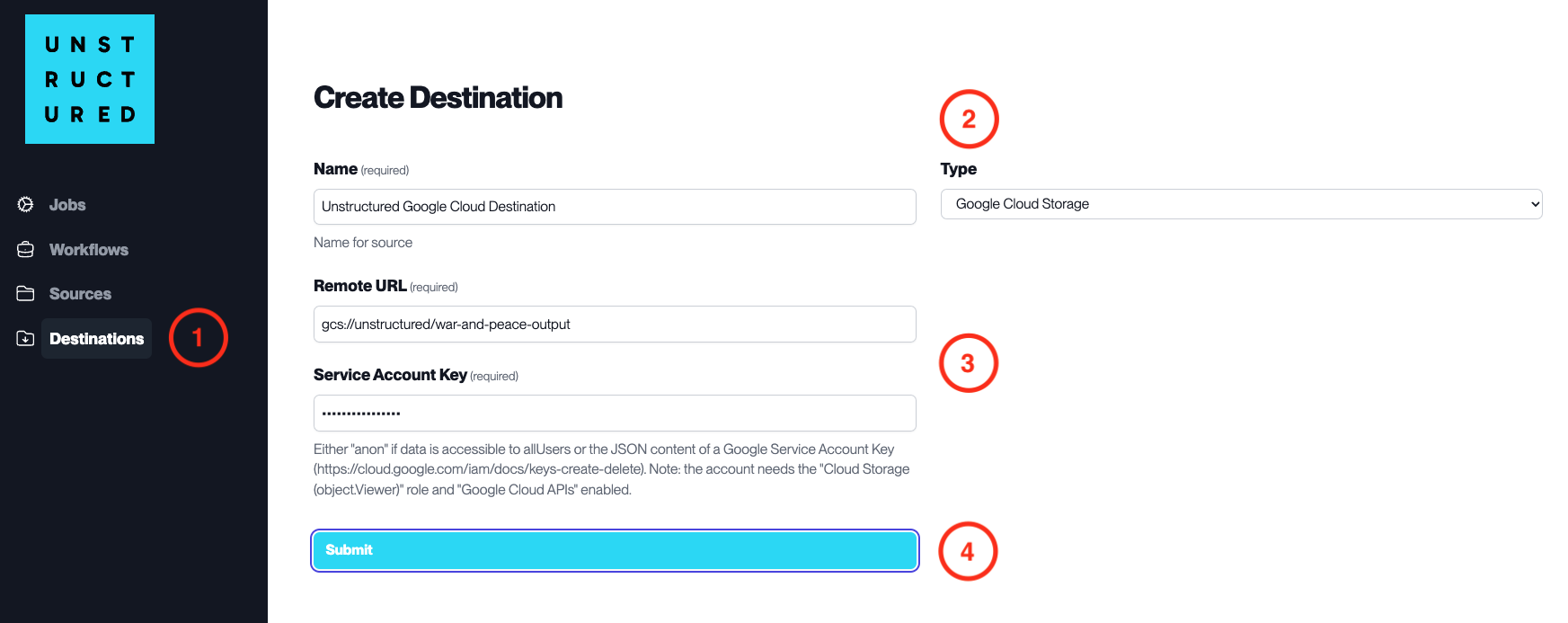
Access the Create Destination Page. Navigate to the “Destinations” section within the platform’s side navigation menu and click on “New Destination” to initiate the setup of a new destination for your processed data.
Select Destination Type. Select Google Cloud Storage destination connector from the
Typedropdown menu.Configure Destination Details
Name(required): Assign a descriptive name to the new destination connector.
Remote URL(required): Enter the Google Cloud Storage bucket URL where the data will be stored.
Service Account Key(required): Provide the Service Account Key that has been granted access to the specified Google Cloud Storage bucket.
Submit. Review all the details entered to ensure accuracy. Click ‘Submit’ to finalize the creation of the Destination Connector. The newly completed Google Cloud Storage connector will be listed on the Destinations dashboard.